Back to newsroom
Release notesSeptember 23, 2026

Liveline 2.11 Release Notes

Liveline 2.11 brings Explorer subfolders, custom asset renaming, precise 3D positioning with a gizmo and coordinate entry, automated conveyor leg collisions, higher-resolution renders, and the Admin Tool 2.0 migration, plus platform stability and security improvements.
Liveline 2.11 Release Notes

Release 2.11 introduces major enhancements to scene management, layout editing precision, automated collision mechanics, render capabilities, and Admin Tool 2.0 migration, along with critical platform stability and security improvements.

Highlights

  • Explorer subfolders: organize scene assets with nested subfolders.
  • Asset custom renaming: rename assets directly in the scene or Explorer, with custom names reflected in the Bill of Assets (BoA).
  • Precise positioning: precise 3D manipulation with a toggleable gizmo and direct coordinate entry.
  • Automated conveyor leg collision: conveyor leg pads automatically detect underlying surfaces and stop at the correct height rather than passing through floors or lower equipment.
  • Admin Tool 2.0 expansion: key administration modules (Branding, Task Scheduler, Manufacturers, Industries, Instances, Identity and Role Impersonation) migrated to Admin Tool v2.

New features & scene management

Explorer & hierarchy management

  • Multi-level subfolders: create nested subfolders within the Explorer, then drag, drop, move, duplicate and delete nested subfolder structures.
  • Subfolder persistence across project actions: folder and subfolder hierarchies are preserved when sharing projects, copying projects via the Admin Tool, or using Projects-in-Project.
  • Explorer header controls: a new "All Folders & Assets" header adds Expand All / Collapse All controls and bulk actions.
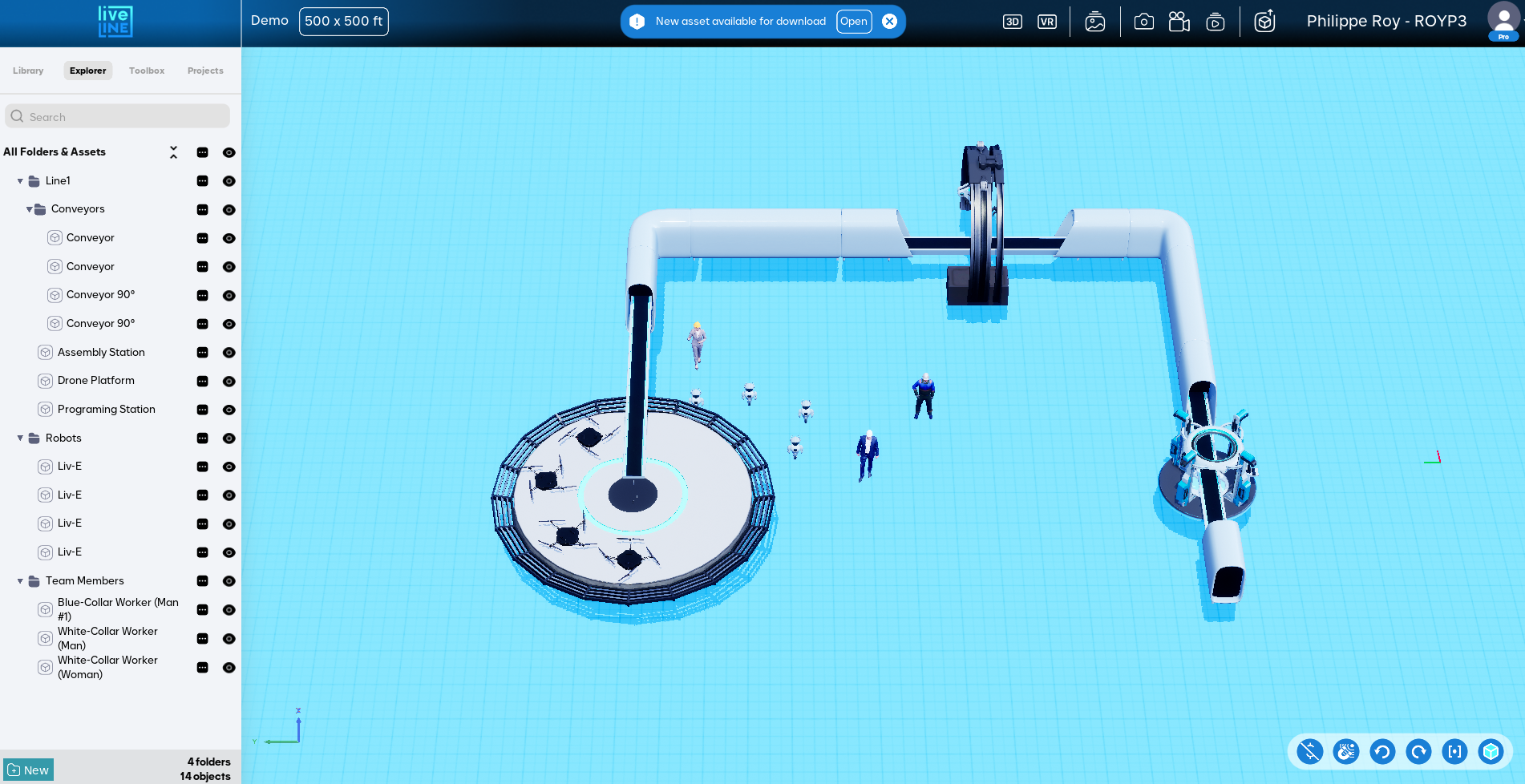
Liveline 2.11 Explorer with nested subfolders

Asset renaming & identification

  • Asset renaming: rename assets directly within Liveline through the Explorer or the asset shortcut menu.
  • Bill of Assets (BoA) support: custom asset names are retained and displayed in the Bill of Assets, and kept through project search, project sharing and project restoration.

3D manipulation & navigation

  • 3D gizmo for asset movement: a toggleable translation gizmo (Ctrl+G) moves single assets or multi-selection groups precisely along axes without magnetic snapping constraints.
  • Property panel position controls: X, Y and Z numeric position inputs in the Property Panel header, with support for mathematical operations (+/-) and group manipulation.
  • Drone mode elevation controls: dedicated vertical movement keybinds in Drone navigation mode (Spacebar / Page Up to move up, Left Ctrl / Page Down to move down).

Automated conveyor leg collisions

  • Smart leg pad alignment: conveyor legs now use procedural mesh local bounds to detect collisions with objects directly beneath the conveyor Z-plane, automatically stopping pads on floor or equipment surfaces. A property toggle lets you enable or disable leg collision.

Rendering, image & video generation

  • Dynamic high-resolution 2D PNG export: 2D export resolution automatically increases from 4K up to 16K based on scene bounding box dimensions.
  • White background render enhancements: floor reflections added to high-quality renders on white backgrounds.
  • Quick draft screenshot option: the quick draft screenshot mode is back in the 3D view alongside the HD camera placement workflow.
  • Hidden camera rendering: render generation now supports hidden camera assets.
  • Download feedback progress bar: asset download progress now reflects true percentage completion.

Admin Tool 2.0 & platform infrastructure

Admin Tool v2 migration

  • Branding configuration: manage custom Video/Image Gen background colors and company logo uploads.
  • Task Scheduler: the Task Scheduler overview moved to Admin Tool v2.
  • Manufacturer & industry management: manufacturer and industry management pages transferred, with logo cropping and asset assignment.
  • Instance & system utilities: instance overview and creation, database table size views, identity details, and role impersonation for Global Admins.

Infrastructure, security & performance

  • Executable code signing: the Liveline client binary is signed with an EV certificate to prevent antivirus false positives.
  • Azure server migration: web virtual machines upgraded to the B2ls_v2 series and operating systems updated to Windows Server 2025.
  • Database security: separate read-only and read-write SQL users configured to minimize operational risk.
  • Default token allocation: new user and instance creation now includes default image/video generation tokens.
  • Python script refactoring: backend PakGen and VideoGen scripts refactored for long-term reliability and maintainability.

Bug fixes & improvements

Client & launcher stability

  • Launcher non-admin download issue: update downloads are no longer canceled on machines where the logged-in user lacks local administrator privileges.
  • Syncing lock on close: the client no longer stays stuck in the "syncing" state after closing a project.
  • Locked machines movement: the gizmo can no longer activate or move locked machines during single or multi-selection.
  • SendGrid password reset: email delivery failures for users with Outlook addresses are resolved.
  • Cross-instance job tracking: image generation status pages no longer display media jobs from other instances.

UI & interaction refinements

  • Folder hiding behavior: hiding a folder now correctly hides all subfolders and nested assets in scene views.
  • Undo stack alignment: toggling asset visibility no longer overrides prior layout edits in the history stack.
  • Project menu preview overlay: the project menu no longer stays overlaid when a video preview starts.
  • Typography standardization: fonts standardized across the Liveline application and rendering outputs.
  • UI contrast: improved contrast on project cards, buttons and background elements.
Book a demo